
The automation of LinkedIn refers to the use of tools to automatically send connection requests, follow-up messages, relevant content and any other activity that you would otherwise have to perform manually on the platform.
Tools like Leadin allow you to safely put your lead generation and prospecting campaigns on autopilot while you focus on other parts of your business.
Here’s why you should consider using LinkedIn prospecting tools:
- They help you save time because you won’t have to manually connect with your prospects and send connection requests one by one.
- They bring personalization to the mass approach. This way, your interactions with users and outreach messages will appear much more natural, no matter how many people you contact.
- They automatically generate reports for your LinkedIn prospecting campaigns. This way you can instantly see how many of your prospects reacted, responded and converted.
- A/B testing becomes easier, since you can experiment with different approaches and follow-up templates to see which ones get the most replies.
- They integrate with other marketing and lead generation tools. By combining your LinkedIn automation tool with other marketing tools like Zapier and Integromat, you can bring a truly multichannel approach to your LinkedIn marketing.
So, you already know the benefits of LinkedIn automation for lead generation.
Maybe you have also already tried some of these tools… and something is wrong.
Some of them lack obvious features, are not safe, or are simply difficult to use.
You are ready to start generating leads on autopilot. You just need the right LinkedIn tool to help you get there.
If that’s the case, we’re here to help.
Here are the 11 best LinkedIn automation tools to start generating leads:
Leadin

Yes, that’s us. But hear us out: Leadin is pretty amazing.
It is the safest LinkedIn tool on the market (a bold claim, but we can prove it). It is super convenient because it works 24/7 on your computer (or at specific hours, depending on your settings), and it is extremely easy to set up.
All of this while being invisible and undetectable by LinkedIn, and without needing to sit in front of your workstation.
This is what we use, and we have many case studies and growth hacks of successful campaigns on our blog.
For example, the time we got over 40 demos in one week on autopilot, without any ad spend. Check out the case study here.
Leadin Features
- Webhooks – Connect Leadin to your other marketing automation tools (Zapier, Integromat…) to create a powerful multichannel workflow.
- Smart Inbox – A dedicated inbox so you never miss a conversation again.
- Dynamic Personalization – Go beyond the simple first name. Example: see the article.
- Security – Dedicated and local IP address to avoid LinkedIn bans.
- Email Integration (multichannel) – Compatible with Gmail, Outlook, SMTP. See multichannel sequences.
- Email Discovery & Verification – Built-in crawlers + real-time verification. Examples here.
- Advanced functions – Auto profile warming, built-in hyper-personalization (images, gifs), blacklist, auto-withdrawal of pending requests, and more.
- And more – Discover how to generate leads with your first campaign.
Who is Leadin for?
Leadin was designed specifically for marketers, salespeople, growth-hackers, and lead generation agencies / or people managing multiple LinkedIn accounts.
With an easy-to-use dashboard and the ability to switch between accounts in a second, managing LinkedIn accounts has never been easier.
Price
To discover the best all-in-one sales automation software, Leadin starts at €97/account per month and comes with a 14-day free trial.
LinkedIn Sales Navigator
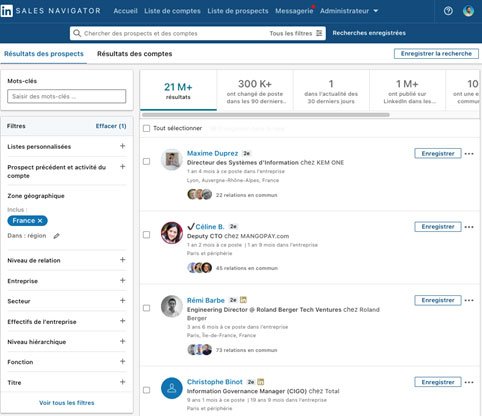
If you’ve been using LinkedIn to generate leads for some time, you’ve probably asked yourself:
Is LinkedIn Sales Navigator worth it?
It’s time to find out. First, what does this tool offer?
Main features of Sales Navigator
- Advanced search – Find prospects and companies with optimized search.
- Lead recommendations – Personalized target suggestions.
- CRM & tracking – Automatically save leads, add notes, connect your CRM.
Who is this tool for?
Sales Navigator is for people who already actively use LinkedIn and want access to
advanced features.
Combined with a tool like Leadin, the results can be impressive.
Price
- Professional – €65/month
- Team – €95/month
- Enterprise – custom
A 30-day free trial is available
here.
—
Phantombuster

Phantombuster is a no-code LinkedIn automation and lead generation tool. It allows you to scrape audiences and automate actions on LinkedIn and other platforms.
Features
- Network Booster – Automatic invitations.
- Profile Scraper – Data extraction.
- Message Sender – Sending personalized messages.
- Auto Commenter/Liker – Automated engagement.
Who is this tool for?
Useful for quickly scraping data and using it with another LinkedIn automation tool.
Price
From €0 to €900/month depending on usage. Strategy example
here.
—
TexAu

TexAu is an automation platform that allows you to extract data and automate LinkedIn tasks (and other networks).
Features
- Extraction from Sales Navigator.
- Email lookup from profiles.
- Retrieving members of a LinkedIn group.
- Automation of interactions (likes, comments, messages).
Price
From €25/month to €175/month. Free 2-week trial.
—
Dux-Soup

Dux-Soup is a popular Chrome extension to automate LinkedIn prospecting. Simple, suitable for beginners.
Features
- Lead management (notes and tags).
- Profile downloads.
- Basic automation (visits, messages, likes).
Price
Professional – €10/month, Turbo – €35/month.
Leadin vs Dux-Soup comparison.
—
Zopto

Zopto is a cloud-based LinkedIn automation tool, designed for sales teams.
Features
- Advanced filtering (industry, company size, position…)
- Automatic engagement (connections, messages, InMails…)
- Real-time campaign dashboard
Price
Personal – €180/month, Growth – €330/month, Agency – €850/month.
—
MeetAlfred

MeetAlfred is a versatile tool focused on social selling campaigns.
Features
- LinkedIn campaign manager.
- Built-in CRM.
- Email sequences.
Price
Essential – €25/month, Advanced – €55/month, Pro – €100/month.
—
WeConnect

WeConnect is a cloud-based LinkedIn automation tool with enhanced security.
Features
- Multi-campaigns.
- Centralized response management.
- Multi-users.
Price
€45/user/month.
Leadin vs WeConnect comparison.
—
GrowthLead
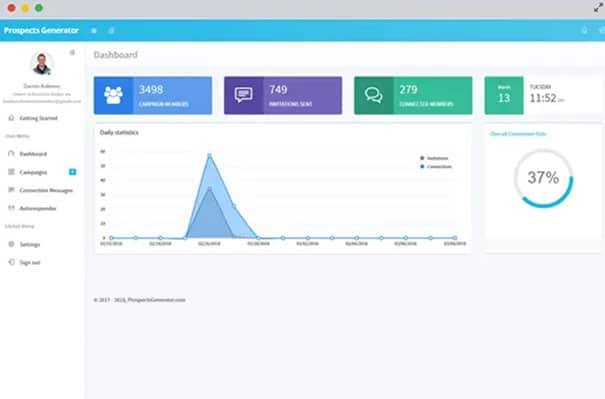
GrowthLead is a B2B cloud tool to manage multi-account prospecting.
Features
- Prospect identification via advanced filters.
- Multi-campaign automation.
- Message tracking and statistics.
Price
- Basic – €62/month
- Pro – €95/month
- Advanced – €135/month
- Done-for-you – €450/month
—
Conclusion
That’s it! I hope this list has been useful to you to
start your LinkedIn prospecting on autopilot.
No matter which tool you choose, always keep in mind the best
security practices.
Leadin was designed to combine security and growth: imitation of human behavior, dedicated IP, management of free InMails and verified prospecting emails. Result: thousands of leads generated without risk.