
Let’s get to the heart of the matter… there is a scourge on LinkedIn. It’s everywhere, highly contagious, and seemingly impossible to escape…Have you ever received a LinkedIn connection message like this one? You have probably received a few as well. They are all the same annoying, low-quality, copy-pasted messages with absolutely ZERO personalization.Yes, we are indeed talking about generic LinkedIn connection messages that resemble “spam“.People often think that because they have used your first name and the name of your industry, it’s enough to give you a reason to accept.We are here to tell you that this is not the case – far from it.But don’t worry. We are going to teach you the best practices for LinkedIn connection messages as well as message templates that work to prospect on LinkedIn effectively.
 You have probably received a few as well. They are all the same annoying, low-quality, copy-pasted messages with absolutely ZERO personalization.Yes, we are indeed talking about generic LinkedIn connection messages that resemble “spam“.People often think that because they have used your first name and the name of your industry, it’s enough to give you a reason to accept.We are here to tell you that this is not the case – far from it.But don’t worry. We are going to teach you the best practices for LinkedIn connection messages as well as message templates that work to prospect on LinkedIn effectively.
We have sent campaigns with the same messages as the ones I am going to show you below. With these messages, our acceptance rate sometimes rises up to 70%!LinkedIn connection request messages highlight your way of networking on LinkedIn, whether for doing business (“social selling”) or even in everyday life.Why is this important? A recent statistic indicated that 98% of sales representatives with more than 5,000 connections on LinkedIn generally exceed their sales targets.So, what do you think about the effort that these high-performing sales representatives put into their connection request messages? Essential and justified, isn’t it?Just like in real life, it is important to know people and build relationships before establishing business relationships (in “social selling” there is first of all “social”!).And on LinkedIn, it all starts with a well-thought-out connection request message.That’s why we have prepared for you: OROpen the LinkedIn user’s profile. Click on “Connect.”
 Select “Manage”:
 Then “Sent” and “Withdraw” next to the person’s name.
 If you cancel a LinkedIn connection request message, you will not be able to send it again to the same person for the next three weeks.
 This message works because:
 This template works because:
 This message works for the following reasons:
 This message works because:
 This message works because:
 This message works because:
 This message works because:
 This template works because:
 This template works because:
- How to send/cancel a LinkedIn connection request message
- The top 5 do’s and don’ts when sending LinkedIn connection request messages (strategy)
- The 10 best LinkedIn connection message templates to boost your acceptance rate (examples)
How to send/cancel a LinkedIn connection request message?
The right strategy brings the right resultFirst of all, let’s talk about the different degrees of connections on LinkedIn:- 1st degree connections are LinkedIn users who are already part of your network. You can communicate through LinkedIn messages.
- 2nd degree connections are LinkedIn members connected with your 1st degree connections (you have common interests and acquaintances).
- 3rd degree connections are LinkedIn members connected to your 2nd degree connections (you have nothing in common).
How to send a LinkedIn connection request message
Assuming you have already selected your prospects, there are two ways to send a connection request message.In the right corner of their LinkedIn profile, click on “Connect.” OROpen the LinkedIn user’s profile. Click on “Connect.”
How to cancel a pending LinkedIn connection request message
If you have sent a LinkedIn connection request message to a user and changed your mind for some reason, there is a solution to go back.Click on “My Network” in your LinkedIn profile: Select “Manage”:
 Then “Sent” and “Withdraw” next to the person’s name.
 If you cancel a LinkedIn connection request message, you will not be able to send it again to the same person for the next three weeks.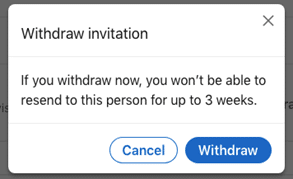
The Top 5 Do’s and Don’ts When Sending LinkedIn Connection Request Messages
Following some common-sense rules when sending LinkedIn connection request messages not only improves your acceptance rates but also prevents you from being temporarily suspended on LinkedIn.Indeed, it only takes a few people refusing your connection request and clicking “I don’t know this person” to get flagged on LinkedIn.Therefore, here are the top 10 do’s and don’ts you should keep in mind when drafting the 300 characters of a LinkedIn invitation request message.On this subject, if you use Leadin for your contacts, the number of characters is limited to 250. This way, we ensure that once Leadin replaces placeholders with actual information, the total character count does not exceed 300.Top 5 (Strategy) – Things to Do When Sending a LinkedIn Connection Request Message (to aim for up to +70% acceptance)
- Write a compelling text to grab their attention
- Personalize your LinkedIn connection request messages to clearly show why you want to connect with them specifically
- Add a hook or call to action so you can continue the conversation once accepted
- Be polite and professional
- Briefly introduce yourself if you have space to do so
Top 5 (Strategy) – Things NOT to Do When Sending a LinkedIn Connection Request Message (to avoid less than <30% acceptance)
- Do not send irrelevant connection requests (make sure you know who you are targeting)
- Do not send generic or empty connection requests (sometimes this increases your acceptance rate, but it decreases reply rate!)
- Avoid making personal references or giving compliments that are not related to professional activity or not justified
- Do not talk only about yourself and your experience
- Avoid selling right away
Examples: The 9 Best LinkedIn Connection Message Templates to Boost Your Acceptance Rate
Before starting, remember that creating a quality personalized connection request message can take time.It is essential to try several and know the effectiveness of your messages in order to successfully invite as many people as possible. For this, A/B tests are very useful.Finally, don’t be afraid to take risks. Be creative, write differently, and test until you get satisfying results!No. 1 – Connect Using a Mutual Connection as Leverage
TemplateHello {{firstName}},I noticed you are connected with {{mutual connection}}.We worked together at {{company}} / on the {{project}} and I enjoyed every moment of that collaboration!Seeing that you also work in the {{industry}} sector, it would be a pleasure to be part of your network as well.Example This message works because:
- You reference a mutual connection or colleague, showing you didn’t find them randomly on LinkedIn
- There is some kind of link between you two (same industry or adjacent sector)
- You open the door to a further conversation (about the mutual connection or your shared industry)
No. 2 – Send a Connection Request Message to a Potential Partner
TemplateHello {{firstName}},I have appreciated your contributions and your work for a long time. I followed your advice regarding {{topic}} that you shared {{where}}. It brought me {{results obtained}}.I would really like to connect with you!Example This template works because:
- It shows you know the person’s work
- Everyone appreciates sincere compliments
- The person will feel valued and happy to help you
- You make space to continue the conversation after connecting
No. 3 – Connect with a LinkedIn Group Member
TemplateHello {{firstName}},I saw that you are also a member of {{Group}}.I would really like to connect with you because we both work in the {{industry}} sector.Example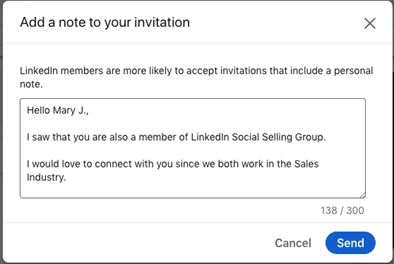 This message works for the following reasons:
- You make a concrete reference to something you have in common (a LinkedIn group)
- Being in the same group means you likely share the same interest or they are in your client avatar
No. 4 – Approach Someone Met at an Event
TemplateHello {{firstName}},I was glad to talk to you during the event {{eventName}} on {{date}}. I see that you are working at {{current company}} and I would be pleased to follow your updates.Thank you in advance for accepting my request.Example This message works because:
- They will feel flattered that you remember them and what you talked about
- You referenced a specific event
- Everyone likes sincere compliments
- You probably work in the same sector or a similar one since you attended the same event
No. 5 – Send a Connection Request Message to a LinkedIn Event Participant
TemplateHello {{firstName}},I saw that you also attended the event {{eventName}}.Personally, learning more about {{topic}} was particularly useful for my business.Anyway, I would really like to connect with you!Example This message works because:
- You made a reference to an event you both attended
- Attending the same event implies a shared interest/topic to continue the conversation
- There is a concrete reference to something you found useful about the event’s content
No. 6 – Contact the Author of a LinkedIn Article/Post
TemplateHello {{firstName}},I discovered a LinkedIn article you wrote about {{topic}}. I really enjoyed your insights on {{key ideas}}.I would love to stay in touch and follow your updates.Example This message works because:
- It shows you know their work
- There is a specific reference to what you liked and what resonated with you
- You can continue discussing the same topic once connected
No. 7 – Send a Connection Request to Someone Who Reacted to Your or Another’s Post
TemplateHello {{firstName}},I saw that you also liked {{Name}}’s post about {{topic}}. I am also involved in this field with my company. Applying some of the things mentioned in the post worked well for me!Is this something you have implemented?In the meantime, I would love to connect with you.Example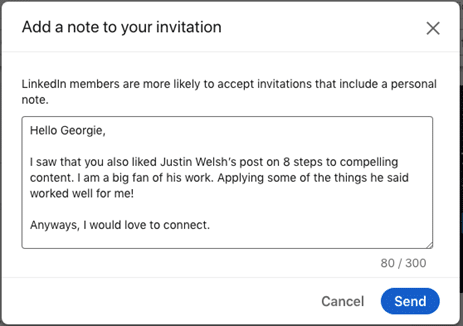 This message works because:
- There is a specific reference to a topic/person you both care about
- You have something in common and could continue the conversation once connected
No. 8 – Contact a Prospect Who Asked a Question in a Post Comment
TemplateHello {{firstName}},I saw that you commented on {{person’s name}}’s article about {{topic}} and that you had a question about {{question}}.I would love to be part of your network and share some resources that could be useful to you.Example This template works because:
- You make a specific reference to someone’s comment/question
- It’s an excellent way to steer the conversation and learn more about the prospect’s needs
- You offer help on a specific topic
No. 9 – Suggest a Connection to a Potential Candidate as a Recruiter
TemplateHello {{firstName}},I am reaching out to you for your strong experience as a {{profession}}.The company {{company}} is currently looking for a {{position}}.If this interests you, we would be glad to arrange an interview and discuss further.Example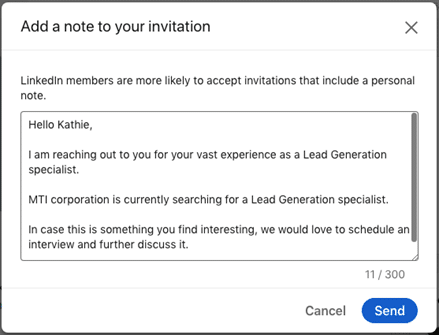 This template works because:
- The recruiter did research and contacted a relevant profile
- The connection request message is very personalized
- Even if the person is not interested now, they will certainly want a recruiter like this among their connections
Conclusion
We have just seen the sales practices used by industry leaders to grow their LinkedIn network and generate leads.It is proven that these LinkedIn connection request messages, simple but impactful, will help you stand out and send messages that get replies!Be creative. Adapt them to your needs.In any case, remember to keep these 5 elements in mind when sending LinkedIn connection request messages:- Write a compelling text to grab their attention
- Personalize your connection request messages to clearly show why you want to connect with them
- Add a hook or call to action to continue the conversation once accepted
- Be polite and professional
- Briefly introduce yourself if you have the space